Banner

Monday, February 18, 2013

How to Play Flash on the 6.1-Inch Huawei Ascend Mate

Huawei Ascend Mate
Huawei Ascend Mate
How large is too large for a smartphone's display? Looking back on the CES 2013, you'll find some attractive large screen (5-inch and more) handsets: Sony Xperia Z, LG Optimus Vu 2, etc. Today we'll continually talk about another gigantic one: the 6.1-inch Huawei Ascend Mate.

The Huawei Ascend Mate will be sold in China firstly in this month, priced at $ 575 (about RMB 3583). This device comes up with a 6.1-inch screen, which is larger than Samsung Galaxy Note II's 5.5-inch one. However, the screen resolution is only in 720p. 


Detailed specifications from Huawei official website:

  • 6.1-inch HD IPS + 1280 x 720 LCD touchscreen with Corning Gorilla glass
  • Android 4.1 Jelly Bean
  • 1.5 GHz quad-core Hi-Silicon K3V2 processor
  • 2GB of RAM
  • 8.0 MP rear-facing camera with HDR
  • 1.0 MP HD front-facing camera
  • 4050 mAh battery
Thought the Ascend Mate isn't equipped with a 1080p display, it's still suitable to play HD movies and games. Then how about playing SWF on Ascend Mate? Since Android and iOS platforms are no longer supported by Adobe Flash, user who want to play swf files on devices should look for alternatives. For Android geeks, currently they have two choices: install a flash player from Google Play, or convert flash to videos and play on their devices.

Today we'll have to see "How to convert flash files and play them on Huawei Ascend Mate". As an old saying goes, "a handy tool makes a handy man", to convert swf files to videos, we need a handy tool called SWF to MP4 Converter.

The following process shows how we usually do the conversion.

Step 1 Download, install and launch SWF to MP4 Converter, a free download tool that helps you convert swf files to Huawei Ascend Mate suitable videos.

Step 2 Import flash file. On the main user interface, click "Browse..." button and choose "From Folder" option to import local swf file from your computer. You are also able to select "From Url" option to input an online flash file to the converter.
Import flash file
Import SWF file
Step 3 Output format setting. Click "Export" tab and then check the "Video" box. Choose "HD H.264 MPEG-4 AVC Video (*.mp4)" option from the "Style" drop-down menu.
Output format setting
Step 4 Now set the parameters of output video to ensure the video can be played on Ascend Mate perfectly. Click "Settings" button, a window named "Profile" pops up. Since the resolution of the phone is 1280 * 720 pixels, we set the video size as "1280 x 720", audio codec as "AAC" and video codec as "H.264". Click "OK" button to confirm.
Parameters setting
Parameters setting
Step 5 Start conversion by clicking the "Convert" tab. You can click "Play and Capture" and "Finish" buttons to start the process. When it's finished, you can simply transfer video to your smartphone. Enjoy playing swf on Huawei Ascend Mate!
Start conversion
Start conversion


Related articles:


Sunday, February 17, 2013

5 iOS Apps for Tracking NBA All Star Game 2013

all star 2013 houston
The NBA All-Star Weekend 2013 is being held now in Houston, Texas. Have you watched games in front of the TV, or you're lucky enough to watch them in Toyota Center? I know some of friends are too busy and inconvenient to watch games, here I've found some useful iPhone and iPad apps for tracking NBA All Star Game 2013 as well as NBA regular season games.


NBA All Star 2013 icon No.1 NBA All-Star 2013 (iPhone or iPad)
Price: Free
Rated: 4+
Requirements: iPhone, iPod touch and iPad.
Introduction: The official NBA All-Star 2013 App is the ultimate guide to All-Star games. Keep up to date with event information, live scores, video and photos. Vote for your favorite players to win contests during the weekend and play predictive games.
Screenshots:
NBA All Star 2013 001
NBA All Star 2013 002
NBA All Star 2013 003


Price: Free ($4.99 for NBA Game Time Plus, $15.99 for League Pass Mobile)
Rated: 4+
Requirements: iPhone, iPod touch and iPad.
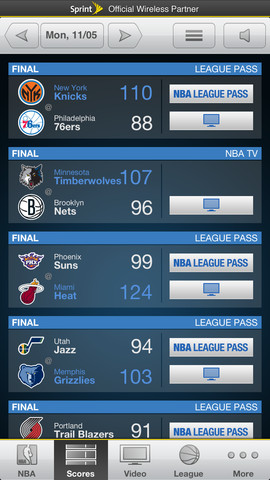
Introduction: The Award winning NBA Game Time is the official app to follow the NBA wherever you are.
Note: Only NBA Game Time from Sprint brings you FREE unlimited live coverage of every NBA game. Sprint customers get exclusive access to live NBA games on the Sprint TV ESPN channel and free access to NBA Game Time Plus with live radio broadcasts, game video alerts and more. All FREE with an Unlimited data plan from Sprint. 
Key features:
  • Excitement Notifications. Get notified when a game gets exciting at crunch time.
  • Customizable Threshold Notifications. Get notified when a player or team you are interested in passes a threshold in a specific game.
  • Twitter streams for each game. Follow the social interaction of the game as it happens.
  • Game experience redesign.
  • Customize to feature your favorite team.
  • Watch highlights from around the league. 
  • Up to date news and info from around the league.
  • Game notification capabilities.
  • Play-by-play experience.
  • Stats, scores, and schedules for every NBA game.
Screenshots:
NBA Game Time 2012-13 001
NBA Game Time 2012-13 002
NBA Game Time 2012-13 003

NBA Game Time 2012-13 004


Price: $0.99
Rated: 4+
Requirements: Optimized for iPhone 5.Compatible with iPhone, iPod touch and iPad.
Introduction: Listen Live in the Background to Professional Basketball games!
Key features:
  • The most stations anywhere.
  • Designed for all iOS devices.
  • Automatic updates.
Screenshots:
Pro Basketball Radio & Live Scores 001
Pro Basketball Radio & Live Scores 002
Pro Basketball Radio & Live Scores 003


Price: Free
Rated: 4+
Requirements: Optimized for iPhone 5.Compatible with iPhone, iPod touch and iPad.
Introduction: Yahoo! Sportacular is designed to give sports fans their scores, news and stats as quickly as possible in a clean, beautiful layout. Experience fast, personalized, and easy access to live scores and information on your favorite teams, players and leagues.
Key features:
  • Customize your alerts and get instant reminders for specific events, like game start, scoring plays, red-zone or close game situations.
  • Get coverage of sports action from NBA, MLB, NHL, NFL, MLS, NCAA, NASCAR and more.
  • Get coverage of Soccer and football games.
Screenshots:
Yahoo! Sportacular 001
Yahoo! Sportacular 002
Yahoo! Sportacular 003


WatchESPN icon
No.5 WatchESPN
Price: Free
Rated: 4+
Requirements: Optimized for iPhone 5.Compatible with iPhone, iPod touch and iPad.
Introduction: Download the FREE WatchESPN app to your iPhone, iPad or iPod touch and get 24/7 access to live streaming feeds from ESPN channels. Stay connected to live sports and shows from ESPN - wherever and whenever you want them.
Key features:
  • Live streaming access to the top events from the ESPN family of networks, including: NBA Regular Season and Playoffs, MLB, tennis, college football and basketball, etc.
  • Up-to-the-minute news, highlights and analysis with live streaming access to your favorite ESPN shows, including: SportsCenter, SportsNation, etc.
  • Easy-to-use search functionality for locating your favorite teams, shows and events.
Screenshots:
WatchESPN 001
WatchESPN 002
WatchESPN 003
WatchESPN 004


Related article:

Tuesday, February 5, 2013

5 iPhone Apps for Your Sweet Valentine's Day 2013

Valentine's Day 2013 Apps
Happy Valentine's Day 2013!
The American's total spending during Valentine's Day 2013 will reach $18.6 billion, reported by the National Retail Federation. On such a day of love and sweetness, couples may think of questions like "where to have dinner" or "how to show off your love to friends". Here I've found some Valentine's Day apps for iOS devices, ranging from free holiday gifts, dinner reservation,  Valentine cards to sweet photos. Hope some of them may help, whether you are happily single, on the lookout for that special someone or are living happily with your heartthrob.


Valentine's Day 2013 icon
No.1 Valentine's Day 2013: 14 free apps for love
Price: Free
Rated: 9+
Suitable for: Optimized for iPhone 5. Compatible with iPhone, iPod touch and iPad.
Introduction: Valentine’s Day 2013 has picked the 14 best free apps to get you ready for the romantic mood by tailoring them to your lifestyle.
Key features:
  • Handpicked apps that suit your lifestyle: a truly personalised app discovery experience.
  • Gorgeous graphics and artwork, perfect for getting you in a loving mood.
  • A selection of great melodies to get you in the mood for romance, just shake your device to change the tune.
  • Earn special gifts. Every time you open a new present, your love meter fills up and earns you six exclusive wallpapers to download.
Screenshots:
Valentine's Day 2013 001
Valentine's Day 2013 002
Valentine's Day 2013 003

OpenTable icon
No.2 OpenTable
Price: Free
Rated: 4+
Suitable for: Optimized for iPhone 5. Compatible with iPhone, iPod touch and iPad.
Introduction: Planning to have candlelight dinner with your honey on February 14? The reservation could be a game of luck. Fortunately, the OpenTable app helps you book a table at more than 20,000 restaurants in the US and Canada. Plus, members can earn dining points to pay for meals at any OpenTable restaurant.
Key features:
  • Find restaurants near you.
  • See available tables in real time, in a list or on a map.
  • Narrow your search by cuisine, price, or neighborhood.
  • Browse menus, diner ratings, and reviews.
  • Invite friends to dine with you.
  • Add upcoming reservations to your calendar.
  • Make out-of-town reservations when you travel.
Screenshots:
OpenTable 001
OpenTable 002
OpenTable 003

Price: Free
Rated: 4+
Suitable for: Optimized for iPhone 5. Compatible with iPhone, iPod touch and iPad.
Introduction: With hundreds of eye-catching and customized designs to choose from, skip the run-of-the mill greeting cards and send a personalized Valentine e-card or paper postcard with Red Stamp app.
Key features:
  • A clever card-finding feature to help you scroll and select the perfect design pre-filled with editable sentiments and prompts written.
  • 600+ thank you notes, greeting cards, birthday cards, invitations and personalized stationery with multiple color schemes.
  • Photo-friendly designs, with ability to grab photos from camera roll or take pictures in-app.
  • A virtual mailbox to help you manage your favorite, premium and sent correspondence.
  • Seamless integration with your device’s contacts to easily order and mail paper postcards to everyone on your list.
  • Postcards printed on premium, eco-friendly white card stock.
Screenshots:
Red Stamp Cards 001
Red Stamp Cards 002
Red Stamp Cards 003

Couple icon
No.4 Couple
Price: Free
Rated: 4+
Suitable for: Optimized for iPhone 5. Compatible with iPhone, iPod touch and iPad.
Introduction: Couple (formerly named Pair) is the easiest way to stay in touch with the person you love, making it easy to share the little things in life with each other.
Key features:
  • Connect to only one other person for the most private messaging experience.
  • Send photos, videos, audio notes, and text messages for free.
  • Draw cute sketches for your partner in realtime, or play Tic-tac-toe.
  • Instantly share your location with your partner.
  • Get reminders for important dates such as anniversaries and birthdays.
  • Use your shared to-do list to remind your partner to pick something up on the way home.
  • Other special features designed for people in relationships.
Screenshots:
Couple 001
Couple 002
Couple 003

Price: Free
Rated: 4+
Suitable for: Optimized for iPhone 5. Compatible with iPhone, iPod touch and iPad.
Introduction: Take romantic love photos with fantastic Valentine effects and send them to the one you love! Valentine Cam adds dozens of Valentine effects to your camera or local photos. Share a photo with a great Happy Valentine's day banner with your family or friends.
Key features:
  • Variety of fantastic Valentine effects available.
  • Add effects to your camera or local photos.
  • Place the effects anywhere you like.
  • Both front and back cameras are supported.
  • Share your Valentine photos directly and instantly on Facebook or send them via email.
Screenshots:
Valentine Cam 001
Valentine Cam 002
Valentine Cam 003


Saturday, February 2, 2013

5 Free Download Flash Games for Valentine's Day 2013

Happy Valentine's Day
Happy Valentine's Day!
Today is February 2nd,almost 12 days left before Valentine's Day.I see some of my colleagues trying their best to make a perfect holiday schedule for their lovers. Well, as a single and "underage" young man, I have no special plans for the day at all. And how about you, my friends? What would you do with your honey on February 14? Having candlelight dinner? Sending him/her a romantic Valentine flash card? Sending him/her flowers with a box of chocolates? Or just staying home and watching a love movie?

Here I collect 5 lovely and free download Valentine's Day flash games for everyone. You can feel free to play them on this post or on their original sources. If you want to download these Valentine's Day flash games to your computer and play with your lover, I recommend this Free SWF Downloader.


Enjoy flash games as well as your sweet Valentine's Day!


No.1 Dude Bear Love Adventure

How to play: Help the bear win the love of a girl collect all the hearts, click panels to move the bear to another bear.


No.2 Zombie Kids Valentines Day

How to play: Move the cupid with ASDW or arrow keys, flap his wings with space bar, shoot and kill zombies by clicking mouse.


No.3 Tickets 4Love

How to play: It's Saturday night and Shawn isn't having any special plans until he sees a gorgeous girl at Frosty Brew. Now help Shawn ask her our for a date by clicking your mouse!
 

No.4 Halloweentine

Half Halloween, half Valentine shooter. Shoot zombies, hearts and other stuff in Helloweentine with cross bow or bazooka. Kill all bad zombies and make a couple of good zombies by shooting at their heart.
How to play: Aim or shoot with mouse. Change weapon with space bar.
Note: Click the blank to start the game.

No.5 Valentines Day Chainsaw Massacre
Kick, punch and chainsaw as you move through this side scroller. Slide blocks and cut barriers.
How to play: Press Up arrow key to jump, Left / Right arrow keys to move. Press A key to use chainsaw D key to attack.