Banner

Monday, January 21, 2013

5 iOS Apps to Help You Look After Your Lovely Pets

dogs and cats
Cute kitten and puppy
Do you raise pets, such as cats and dogs in your family? According to the newest APPA National Pet Owners Survey, there are more than 86 millions cats and 78 millions dogs living in the USA. Owners always treat their pets as family members. Since cats and dogs can never talk, do you know any solution if your pet felt sick, got hurt or poisoned? Do you know how to train your pets? If you haven't any experience in raising pets but you're planning to get one, how to choose a breed that fits you?

Well, here I've collected some pet - raising related apps from apple app store, hope some of them may help you.


Pet First Aid icon
No.1 Pet First Aid
Price: $3.99
Rated: 4+
Suitable for: iPhone, iPad and iPod touch.
Introduction: This app has detailed articles, video and illustrations to help you care for your dog or cat. Record your pet’s vital medical information to ensure their veterinarian is never more than a touch away, and your pet will never miss another vaccination.
Key features:
  • Detailed videos such as: restraint, muzzling, CPR, bandaging and many more.
  • Dozens of articles include: bleeding, poisoning, drowning, burns, etc.
  • Save vital medical information for all your pets.Track and graph your pets weight.
  • All articles, videos, and illustrations are bundled with the app for offline or wilderness access.
Screenshots:
Pet First Aid 001
Pet First Aid 002
Pet First Aid 003
Pet First Aid 004


Price: Free
Rated: 4+
Suitable for: iPhone, iPad and iPod touch.
Introduction: This free app provides over 1,000 exquisite photos and encyclopedic information on over 240 popular and rare dog breeds.
Key features:
  • Search by dog breed by group with a thumbnail image and breed name.
  • Instantly search for a breed by selecting simple reliable lifestyle settings (children, minimal shedding) or by indicating desired physical attributes (floppy ears, small size). 
  • Learn detailed information about each breed including size, temperament, habit, etc.
Screenshots:
Perfect Dog 001
Perfect Dog 002
Perfect Dog 003
Perfect Dog 004

iPetCare
No.3 iPetCare
Price: $4.99
Rated: 4+
Suitable for: iPhone, iPad and iPod touch.
Introduction: With this app,you can quickly and easily gather and browse all the information about your pets, dogs, cats and mammals.
Key features:
  • Store everything related to your pets identity and care: name, picture, planned medical treatment and weight chart.
  • Provides reminders of scheduled treatment, as well as the opportunity to monitor the variations in your pet's weight.
  • Manage a directory containing the information (name, address, phone numbers) of your pets' care providers, such as veterinary surgeons, pet boarding facilities and grooming parlors. Easily locate them on a map, call them or send them a text message. 
  • Basic information about vaccinations, general care, feeding and identification regulations. 
  • Stay tuned to pet news and to check web pages and audio podcasts with several RSS feeds relating to cats, dogs and other animals.
Screenshots:
iPetCare 001
iPetCare 002
iPetCare 003
iPetCare 004


Price: $1.99
Rated: 12+
Suitable for: iPhone, iPad and iPod touch.
Introduction: This app has information on hundreds of household products and plants that are potentially toxic to your pet, and steps to take if your dog or cat is exposed to one of these toxins.
Key features:
  • Life-saving access to poison information with one-touch direct dialing to Pet Poison Helpline.
  • A searchable database of over 250 poisonous plants, foods, medications and household items, all with pictures.

  • Descriptions of how specific poisons affect your pet, their alternate common names, and symptoms to watch for.
  • Instructions on what to do if your dog or cat is exposed to a dangerous substance.
Screenshots:
Pet Poison Help 001
Pet Poison Help 002
Pet Poison Help 003
Pet Poison Help 004

Price: $2.99
Rated: 4+
Suitable for: iPhone, iPad and iPod touch.
Introduction: With the help of this app, it’s easy to get any dog to behave and respond to your commands. Whether your dog is big or small, young or old, you’ll find lots of tips and suggestions. 
Key features:
  • Step-by-step video demonstrations of “sit" “stay" “heel" “come" and other common commands.
  • Techniques specially suited for large and small dogs.
  • Special sections on puppy training, and the care of older dogs.
Screenshots:
Dog Training 001
Dog Training 002
Dog Training 003
Dog Training 004

Thursday, January 17, 2013

Free Download Puzzle Game: Wake Up The Box 5

wake up the box 5
Wake Up The Box 5 flash game
Wake Up The Box 5 is the fifth and newest version of the flash game series. Developed by Armor Games, this puzzle game is also available on apple app store ($0.99 for new levels).
wake up the box 5 for iPad
Wake Up The Box for iPad
Those boxes become sleepy again! What you need to do is to draw shapes on the play-field and and let gravity take its course to knock the boxes awake!


Screenshots of Wake Up The Box 5 flash game
wake up the box 5 001
wake up the box 5 002
wake up the box 5 003
wake up the box 5 004


Play Wake Up The Box 5 online
Draw specific shapes on the play-field with mouse and wake the sleepy boxes up. Previous stages are very easy but the following ones could become quite difficult and challenging.

Download the flash game to your computer
Do you like playing this online flash game? Well, I really want to play it on my computer directly without network connection. However, due to strict copyright protections by Armor Games,this game is not allowed to be download legally. But technically, it's possible and even easy to grab flash games off websites.

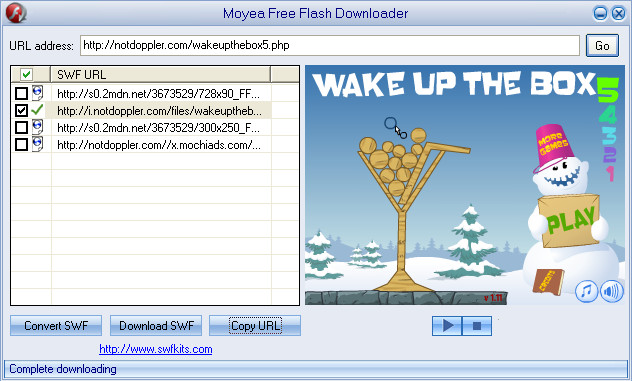
Here we introduce a professional tool, the Moyea Free Flash Downloader, to complete our mission. Copy the URL address of the game and click Go button. All flash (.swf) files can be detected by the software. Select and filter files you want, then click Download SWF button to start the process. After a few minutes...done!
free flash downloader
Free Flash Downloader
The downloaded flash games can be simply played with web browsers (Chrome, Firefox, etc) on your computer. If you want to play flash on iOS or Android devices, just download a suitable mobile flash player on apple app store or Google Play.


Related article: How to Download Flash Games and Play Them Offline?

Tuesday, January 15, 2013

How to Transfer Stuff from iPhone to Android Phones?

How can I transfer stuff from apple to Android?
Fellows, had you changed your old mobile phone to a new one during Black Friday or Cyber Monday? Well, I know many people have converted their old iPhone to a shiny new iPhone 5 or even changed  to an Android one. Since iPhone and Android phones use different OS, there comes a question: How can I transfer stuff from iPhone to Android? Actually there are different methods to transfer different stuff.  Here we'll discuss this issue.

Transfer contacts
There are several ways to transfer contacts from iPhone to Android. 
  1. Sync contacts on iTunes to your computer. Then plug the Android phone in the computer via USB cable, find the file that your contacts are in, drag and drop it to the Android.
  2. Use an app named My Contacts Backup. This tool is able to export contacts from iOS devices. You can email the file to Gmail account and import it from there.
Transfer personal photos and videos
You may have shot and stored tons of photos and videos on your iPhone. Transfer and continually view them on your Android.
  1. Based on apple's official guide, personal photos and videos from iOS devices can be transfer to your computer. Then you can simply transfer them to Android. Click here for detailed tutorial.
  2. Don't wanna use computer? Try Dropbox. Once install Dropbox on both iPhone and Android phone and use same account, you can back up personal photos and videos to the cloud. Then restore your stuff to Android.
Transfer commercial music and movies
  1. For purchased music and movies, just connect your iPhone to iTunes and click the Transfer Purchases button. iTunes will begin copying purchases made with any account for which the computer is authorized. After that, click on Music or Movies library to display files, right-click on a specific file and choose Show in Windows Explorer from the drop-down menu. You'll find the file stored in a folder on your computer hard disk. The following step is just a piece of cake, as we all know how to drag and drop it to Android. Click here for more information.
  2. Since some music and movies on iPhone are non purchased on iTunes, it's impossible to grab them to computer directly. In this situation, you may need a professional tool named iTransfer. It's able to transfer non purchased media files from iOS devices to iTunes library or computer hard disk. The tool can also transfer files among devices and iTunes in different apple IDs. Please feel free to visit here for the transference tutorial.
The above methods and are how I normally back up contacts and media files from an iOS device to an Android device. Some of them may seem stupid or inefficient, but they really work for me. If you have know some more advanced and convenient ways to do the transference, please do not hesitate to tell me. Thanks in advance!

Monday, January 14, 2013

5-Inch Smartphone with Widescreen: LG Optimus Vu 2

LG Optimus Vu 2 front view, pic from phoneArena
Do you remember or know a widescreen smartphone called LG Optimus Vu? This handset has a Verizon customized model named LG Intuition. It was launched to grab large screen market share with Samsung's Galaxy Note II but finally failed. LG Optimus Vu 2, the successor of LG Optimus Vu, was shown up at CES 2013. Actually this model had been announced last autumn, but now we could finally have a detailed and clear review of the phone.

Same as its predecessor, the LG Optimus Vu 2 has an odd and nearly square design. The screen's length-width ratio is 4:3, quite unique from any other main current smartphones. According to the hands on review from phoneArena, there's almost no difference between the 2 generations. This phone may also be less popular on the market.

The LG Optimus Vu 2 has a full-plastic case, looks quite shiny but easily becomes a fingerprint collector. Moreover, the nearly-square screen makes it difficult to handle the phone by one hand, especially for female users who commonly have smaller hands.
LG Optimus Vu 2 back view
For hardware, the LG Optimus Vu 2 comes with a 5-inch XGA IPS LCD display in 768 x 1024 pixels resolution. Its visual quality may be not as good as those main current 1080p ones, but the screen colors look quite natural and its visual angle is also wider. For software, the phone runs outdated Android 4.0 Ice Cream Sandwich with Optimus UI.
LG Optimus Vu 2 Korea version
As a phablet, the LG Optimus Vu 2 has a touch pen named Rubberdium. However, it's weird that there's no space to insert the pen into the phone. What makes it weirder is the pen can even insert into the 3.5 mm headphone jack!

There's also a highlight on the phone: the LG Vu Talk. It's an application that allows two Vu 2 smartphones to share/sync notes. For example, when we edit text on a Vu 2, it can be displayed on the other device simultaneously. Perhaps this feature currently makes less sense, it's not a bad idea to play games between two Vu 2 users.

In conclusion, The LG Optimus Vu 2 lacks attraction to customers. Compared with the popular Samsung Galaxy Note II and the upcoming Huawei Ascend Mate, Vu 2 could only become a niche model.

Friday, January 11, 2013

6.1-Inch Huawei Ascend Mate Announced at CES 2013

6.1-Inch Huawei Ascend Mate
As people say, the development trend of smartphones is like this: displays are getting larger while their thickness are becoming slimmer. So would our handsets look like news papers at the end?

From we have seen at CES 2013, besides Samsung's Youm flexible screens, other manufacturers are still participating in a game, a competition of large screen smartphones. Sony, LG, ZTE, Alcatel and other brands have unveiled their 5-Inch flagships respectively during the show. However, today we'll talk about another bigger monster --- Huawei Ascend Mate.

How big is too big for a display size nowadays? The Ascend Mate says it could be a 6.1-Inch IPS LCD screen, just a little smaller than Google's Nexus 7 tablet. Incredible, isn't it? Regrettably its resolution is only in 720p and 443 ppi, different from the previous rumor. The screen is covered by Gorilla Glass for protection as well.

The Ascend Mate runs Android 4.1 Jelly Bean OS with Huawei's customized "Emotion UI."  According to the review by phoneArena, its UI is "clean and available for user's further personalization".

As to the other known specs, the Ascend Mate is powered by a 1.5 GHz quad-core processor. A massive 4050 mAh battery is equipped in order to run this monster for up to 2 days of regular usage. Due to its screen size, the phone weighs in almost 200 grams, but still comfortable to be hold in hand. The Ascend Mate also supports microSD card expansion which will be nice to watch videos or play flash on the big screen. The rear camera is an 8.0 MP and supports HD recording. The front facing one is 1.0 MP.

The Ascend Mate will be sold internationally in February. Price about this handset is currently unknown.

Wednesday, January 9, 2013

How to Transfer Music among iPhone, iPad and iPod?

How to transfer media files among iPhone, iPad and iPod?
How many iOS devices do you or your family have? Based on a news report from CNET, it's said apple's iPhone snags its highest US market share at 53.3%. Another report from Apple Insider also claimed that iPad series hit 78.86% of the total tablet market.
Tablet market share in the US and Canada
From the data above, we know that apple's products are usually first choice for the US customers. So it's quite frequent for users to transfer stuff, especially media files like music, movies among different iOS devices. I've always seen questions about transference on twitter, Yahoo answers and some forums. For instance, one asked "how can I transfer music from iPad to iPod".

Well, there should be several situations. If both devices use same apple ID, it would be an easy task to do the transference: Plug one's iPad in computer, launch iTunes and choose "transfer purchases". The music and other purchased stuff can be transfer to iTunes library easily. Then hook the iPod to comp, select what one needs from iTunes library and sync with the iPod. Done.


So what if the two iOS devices use different apple ID? And what if the user wanna transfer non-purchased music from iPad to iPod? Any solutions to solve these problems? The answer is absolutely YES.


To transfer non-purchased media files among iPhone, iPad and iPod, you can use a professional tool named Leawo iTransfer. It's the combination of an iPod Transfer, iPhone Transfer and iPad Transfer. It is just what you are looking for. Then how does this program work? Let's have a look.


Setp 1: Connect iPad to computer

Download, install and launch Leawo iTransfer, then connect your iPad to computer. Storage information can be shown on the interface.
Leawo iTransfer interface
Step 2: Select files and transfer
Click the device name tab on the left side bar, choose "Music" option from the Library drop-down menu. All the music files are listed on the right. Right-click the file to choose transfer it to computer hard disk or iTunes library
Music Library on iPad
Transfer music from iPad to iTunes


Now you can see this music file successfully backed up to computer's iTunes Library.
iTunes Library
Step 3: Transfer music to iPod
Connect the iPod to iTunes. Click iTunes Library and choose Music option. Right-click the music file you want and then select "Transfer to iPod". The file can be transfer to iPod immediately.
Connect iPod to computer
Transfer music from iTunes Library to iPod
The above process is how to transfer music from iPad to iPod with iTransfer tool. The two devices are in different apple IDs. There's no need to authorize computer or sync with iTunes. Therefore, I can share media files, such as songs, movies, books, apps, ringtones, to any of my friends who also own iOS devices. I can do this easily, so can you!


Related articles:

How to Transfer Songs from iPad 4 to Computer?


Tuesday, January 8, 2013

CES 2013: 4-Inch Budget Windows Phone 8 Huawei Ascend W1 Unveiled

Huawei Ascend W1,pic from Windows Phone Central
Two months ago I posted an article about Huawei's very first Windows Phone 8 --- the Ascend W1, which should had been announced in December. According to CNET's report, Huawei finally unveiled this tardy handset at CES 2013 in Las Vegas.

The phone's hardware specs are almost the same as previous leaked ones.The Ascend W1 comes up with a 4.0-inch display in 800*480 pixels resolution. It also has a 1.2 GHz Snapdragon S4 dual-core processor (with Adreno305 GPU), 512 MB of RAM, expandable 4GB of ROM (up to 32GB), a 1950 mAH battery, a 5 MP rear camera, a 0.3 MP VGA front facing camera, a detachable back case and NFC.


Dimensions of the handset is 124.5*63.5*10.5 mm. Several colors are available for the case: blue, pink, white, black, etc. Seems like it's configuration is a little higher than HTC 8S, another budget Windows Phone 8.

Based on the interview between CNET and Richard Bhudhikanok, Huawei's product manager, sounds like there would be some more expected new devices coming. Bhudhikanok claimed that he's unable to leak schedules or release dates of any new products. He smiled and said the company is developing a new Windows Phone 8 device, which is similar to the 6.1'' Ascend Mate.

Considering that 2 innovative devices to be announced at MWC 2103, mentioned by Bhudhikanok at CES 2013 today, it would probably be a highlight for the February show.